Enter Allocation Data Fields
This section details each of the fields that are available when Allocating Funds in the Provisioning SCOPE account page. It details what you can enter for each field, and provides examples of the data you should enter when allocating funds.
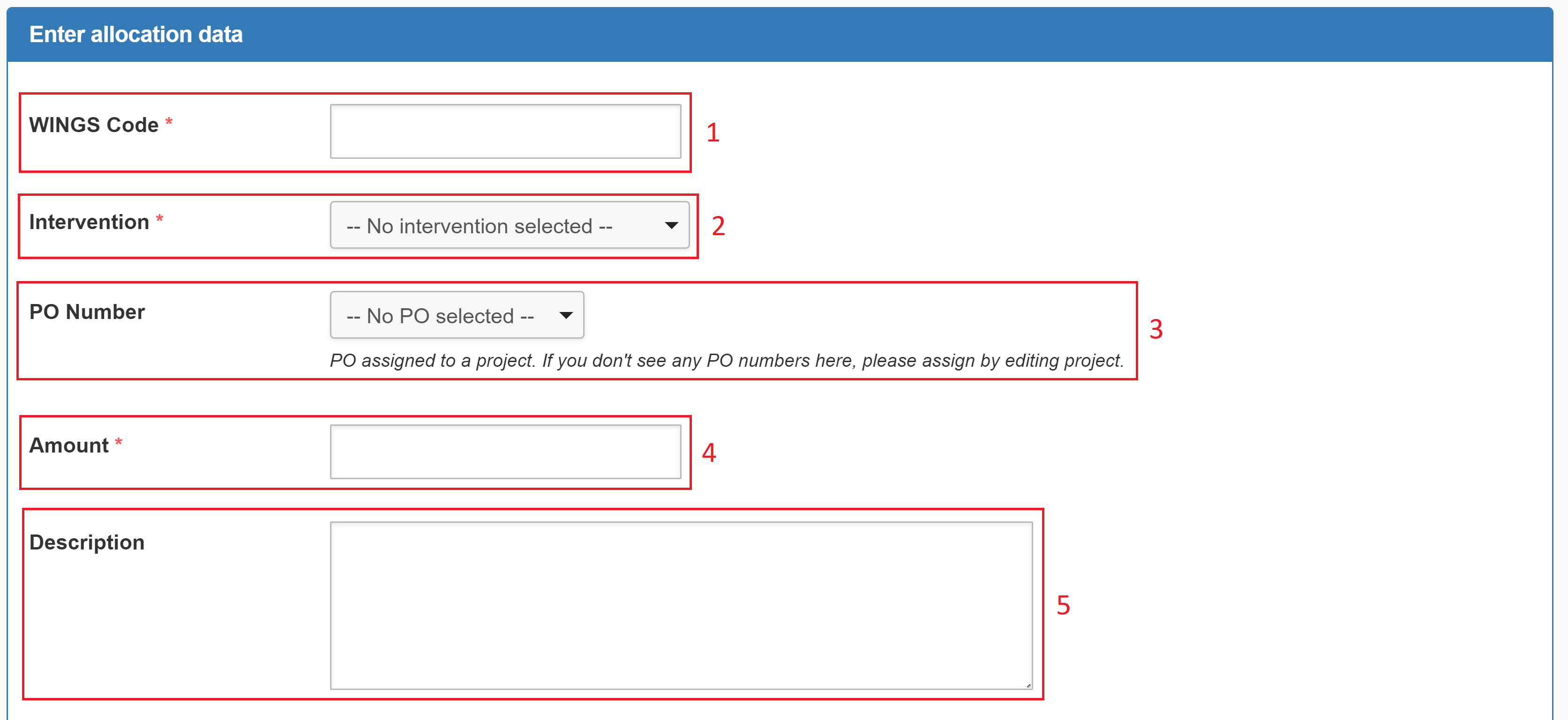
- WINGS Code (Mandatory): Enter the WINGS code for the intervention.
- Intervention (Mandatory): Select the intervention you want to allocate funds to from the drop-down menu.
- PO Number: Select the PO number for the intervention from the drop-down menu.
- Amount (Mandatory): Enter the amount of funds you want to allocate to the intervention.
- Description: Add a description to help identify the intervention or to make notes about the funds you are allocating to the intervention.
Examples
In this example, we allocate funds to an intervention.
|
Field |
Value |
Notes |
|---|---|---|
| WINGS Code | 11223344 | |
| Intervention | New intervention | |
| PO Number | 55667788 | |
| Amount | 100,000 | |
| Description | Funds allocated to new intervention. | The currency has already been selected when setting up the intervention. |