Verifying Enrolments
Introduction
Overview
For some Country Offices, once beneficiaries have been enrolled in an intervention they need to be verified before they can be approved by a senior staff member.
Who is responsible for Verifying Enrolments?
Programme is normally responsible for verifying enrolments. Check with your Country Office to confirm who in Programme is responsible in your country.
Why is Verifying enrolments important?
It ensures that the beneficiaries match the approved beneficiary list from Programme's intervention plan.
If your Country Office requires verification of enrolments, enrolments that are not verified cannot be approved as beneficiaries. They will not be included in distribution lists for the intervention. As a result, they will not receive any entitlements.
What do I need to do before Verifying enrolments?
- Ensure that setting up an intervention and enrolling beneficiaries are completed first.
- You must be familiar with the intervention plan including the planned caseload and the list of approved beneficiaries.
Where can I learn more?
For more information on approving enrolments, click here to explore related Digital Assistance Services Academy Learning Channel materials.
Instructions
To verify enrolments, log in to SCOPE and perform the following steps:
-
In the Country Office page, click See list of projects and interventions.

-
In the Projects and interventions page, click the intervention you want to verify enrolments for.

-
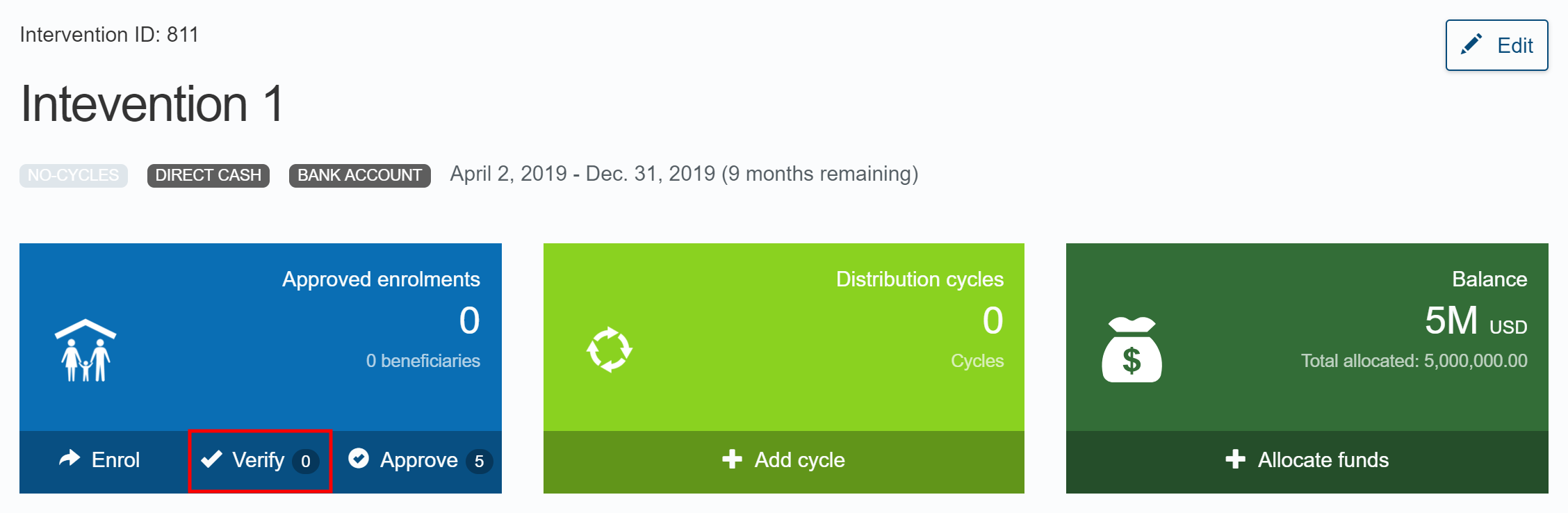
In the Intervention page, click the Verify shortcut in the dashboard or click in the menu.
Note: You can view how many enrolments require verification in the Enrolment box in the dashboard.
-
In the Verify enrolments page, check the enrolment list and verify the confirmed beneficiaries.
- To verify selected enrolments, click the checkbox next to the enrolments. Then, click Verify selected enrolments from the drop-down menu.
- To verify all enrolments, click Verify all X enrolments from the drop-down menu.

-
You will automatically receive an email containing the verification results. The email includes a download link for a CSV file that lists the enrolments and which ones have been verified or failed.